Tax package
Everything your accountant asks for at year end - the year's summary, every payment, expense, invoice and trip as spreadsheets, and the receipts - in one download.
At year end your accountant, bookkeeper or tax preparer asks for the same things every time: what came in and went out, the sales tax, the bank balances, what clients still owed, who you paid for a 1099, the mileage, and the receipts. Tax Package gathers all of it for one tax year, and Download package hands it over as a single ZIP file.
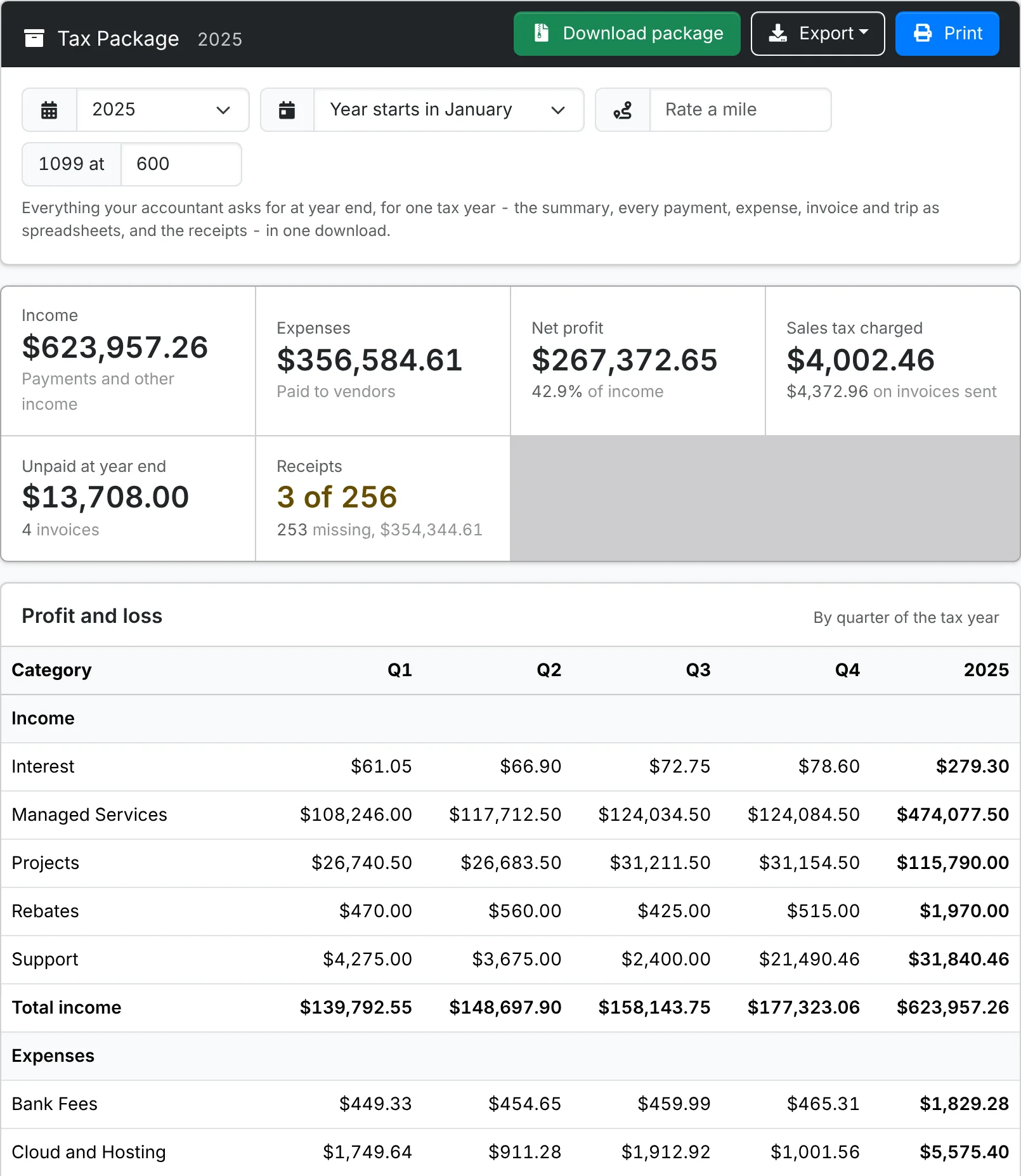
Pick the year
Open Tools > Reports and pick Tax Package, under Finance.
- The year opens on the last tax year that has ended - the one to file. The year you're in is there too, marked (so far), for planning.
- Year starts in is the month your tax year begins. It's January to start with - or April in the UK, New Zealand and India, July in Australia and March in South Africa. Pick another month if your business's year starts then.
- Rate a mile (or kilometre) prices the mileage. It starts at the mileage rate in Admin > Settings > Invoice - put in your tax deduction rate instead if that's what your accountant needs.
What it shows
Along the top: the year's Income, Expenses and Net profit, the Sales tax charged, what was Unpaid at year end, and how many expenses have their Receipts.
- Profit and loss - income and expenses by category, a quarter of the tax year at a time, with the net profit. It's cash basis, the same as the Profit & Loss report: money counts when it arrives or leaves, and transfers between your own accounts aren't income or spending.
- Sales tax - the tax charged at each rate with its registration number, the taxable, exempt and non-taxable sales, and the tax paid on purchases. Each figure is shown twice: On payments received (cash basis) and On invoices sent (accrual basis), so your accountant can use whichever your return needs.
- Accounts - each account's balance on the first day of the year and the last, with the money in and out between, and how far it's reconciled. Check the balances at the end against the bank's statements.
- Unpaid at the end of the year - the invoices sent by the last day and not paid in full by then. They matter on an accrual basis, and one that will never be paid may be a bad debt.
- Vendors for 1099s - for a US company with a January year, the vendors paid enough in the calendar year to need a 1099-NEC or 1099-MISC. 1099 at starts on the IRS threshold for the year - $600 for payments up to 2025, $2,000 from 2026 - and can be changed, as the IRS adjusts it for inflation from 2027. By card and Not by card are split because payments by card are reported on the card company's 1099-K instead.
- Mileage - the trips by agent, how far, how much in their own vehicle, and what it comes to at the rate.
- Expenses with no receipt - so you can attach the missing ones before you send the package.
ITFlow doesn't keep vendors' tax IDs or addresses. Ask each vendor listed for 1099s for a W-9, and let your accountant decide which of them need one - corporations and payments for goods usually don't.
Download the package
Click Download package. The ZIP has:
| File | What's in it |
|---|---|
| Summary.pdf | The report page, laid out for printing |
| Profit and loss.csv, Sales tax.csv, Accounts.csv and the other tables | Each table on the page as a spreadsheet |
| Income.csv | Every invoice payment and other income - date, client, invoice, category, method, account and amount |
| Expenses.csv | Every expense - date, vendor, category, method, account, amount, the tax in it, and its receipt's file name |
| Invoices.csv | Every invoice sent in the year - subtotal, discount, tax and total, and what was paid and still owed at year end |
| Trips.csv | Every trip - who, where, why and how far |
| Receipts | A folder of every expense's receipt, named by date, vendor and amount |
The spreadsheets add up to the summary: Income.csv totals the year's income and Expenses.csv its expenses. Each download is noted in the audit log.
Got receipts still to attach? Add them from each expense's window on Finance > Expenses, then download the package again - Expenses with no receipt shrinks as you go.
Export also has each table as a CSV on its own, and the page as a PDF.